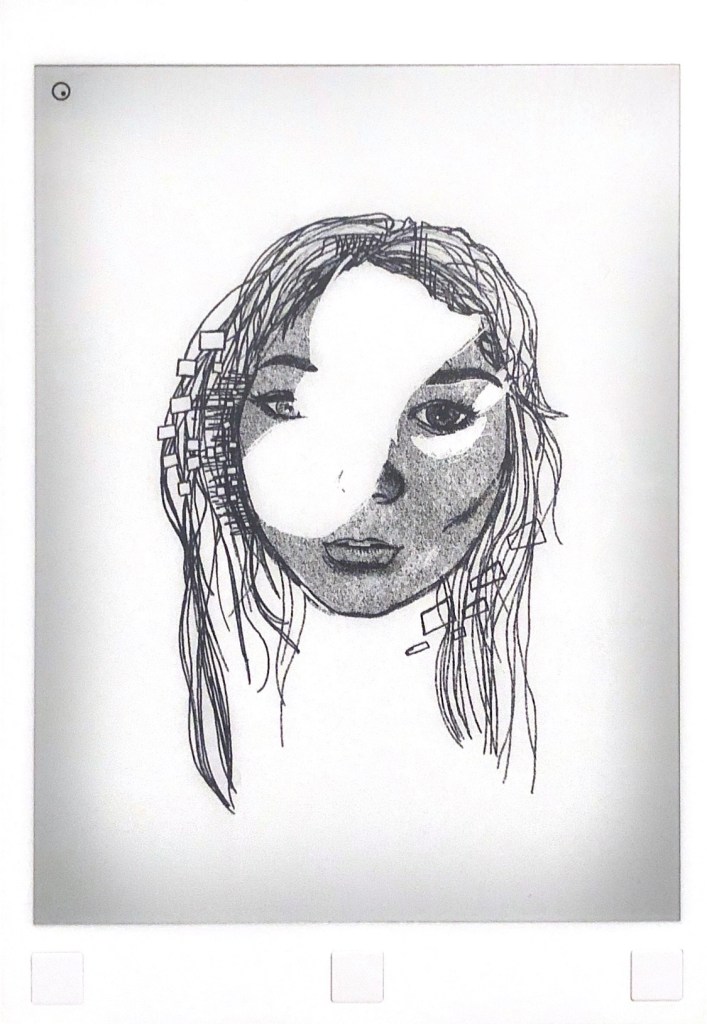
This is a piece I created some time ago titled “Glitch”. The key to this drawing was to make it feel unfinished, leaving the viewer wondering what the missing features may look like or be. The inspiration behind this piece came from a photo of my friend, taken near a window where sunlight created a harsh white marking across her face. To me, the photo looked a bit like a glitch or mishap. I was excited by the idea of drawing a portrait with missing bits and pieces.
To draw this piece, I actually sketched out the entirety of the face first. I did this only to ensure that the facial features don’t look out of place. I don’t work with Photoshop a lot, but I’ve found this tutorial on sketching realistic faces on Photoshop that I find helpful and very similar to the process I typically do on reMarkable. After I finished sketching a normal portrait of my friend, I erased the area of the face where I wanted the glitch effect to be. Adding small white boxes and thin black lines surrounding the face was a decision I made in hopes of accentuating the artwork’s theme and title.
My favorite aspects of my piece “Glitch” are the subject’s eyes, for one looks to be a grey I while the other is dark. I think this detail kept the eyes from blending into the background, which could easily happen with such a large and contrasting focal point: the white patch. I also really like how the shading on the nose and lips turned out for this drawing in particular. I’ve struggled with realism for a while and I can really see improvement through the work I’ve done on this piece. I do think color could improve this drawing a lot, especially in the white areas. If I were to use colors, I would leave the hair and face in black and white and make the glitches more apparent with a rainbow spectrum.
 Artword